Table of Contents
ToggleHomeowners installing outdoor security today face a crowded market, but Google’s Nest Outdoor Security Camera stands out for reliability, ease of setup, and seamless integration with existing smart home systems. Whether protecting a driveway, porch, or backyard, the Nest camera delivers real-time alerts, clear footage, and weather protection without requiring a licensed electrician to wire it in. This guide covers what makes the Nest Outdoor camera worth the investment, how to install it, and whether it’s the right fit for your home security needs. No contractor jargon, just practical insights from someone who’s installed these systems and understands what DIYers actually care about.
Key Takeaways
- The Nest Outdoor Security Camera eliminates the need for hardwired electrical connections, making it a fully DIY-friendly installation that saves hours of installation work.
- With 1080p resolution, 130-degree field of view, and AI-powered intelligent alerts, the Nest camera reduces false notifications while delivering clear footage day and night.
- Battery life ranges from 2–3 months per charge depending on activity level, and USB-C charging takes about 4 hours without requiring camera removal from the wall.
- Seamless integration with Google Home means alerts sync across all your devices, and the camera feeds directly into your existing smart home ecosystem without separate apps or logins.
- Proper mounting at 8–10 feet high with adequate WiFi signal strength is critical; weak placement leads to dropped connections and missed security events.
- The Nest Outdoor Security Camera carries an IP54 weather rating and is ideal for most residential setups when mounted under an eave or slight overhang for protection from heavy rain.
What Makes Nest Outdoor Cameras Stand Out
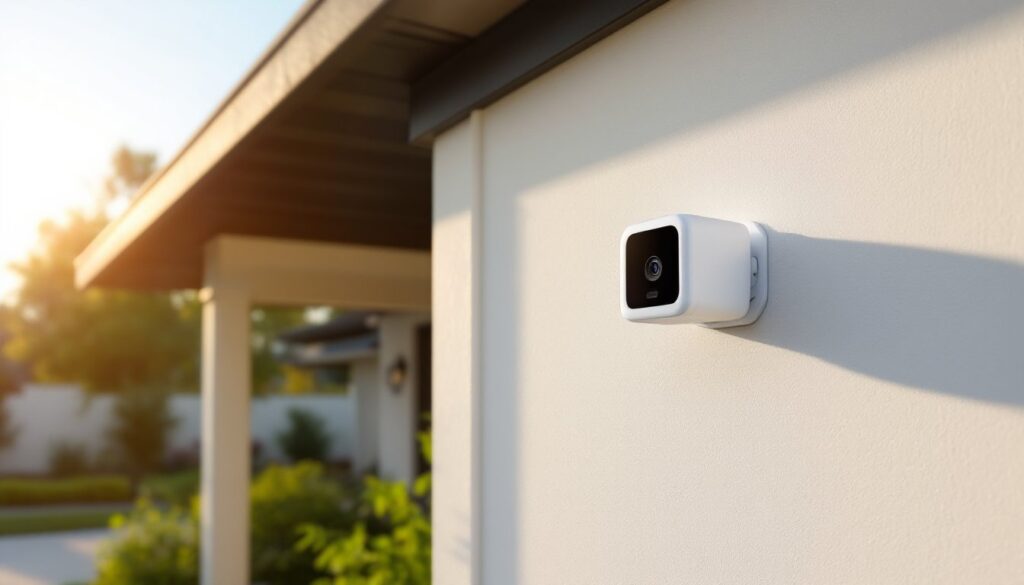
The Nest Outdoor Camera operates on a battery-powered design, eliminating the need for hardwired electrical connections or running cable through walls. That alone saves hours of frustration and keeps your installation completely DIY-friendly. Unlike some competitors that require dedicated wiring or constant power, the Nest uses replaceable batteries and charges via USB-C, making maintenance straightforward.
Integration with Google Home is where the Nest shines. If you’re already using Google Assistant, a Nest Hub, or other Google devices, the camera feeds directly into your ecosystem, no separate app juggling or proprietary logins to manage. Alerts sync across all your devices, and voice commands work without extra setup steps.
Nest also uses AI-powered intelligent alerts to reduce false notifications. The system learns to distinguish between a passing car and a person at your door, which means fewer middle-of-the-night phone buzzes about a raccoon crossing your yard. That intelligence comes from Google’s server-side processing, so the camera itself stays lean and responsive.
Key Features That Deliver Real Home Security
Video Quality and Night Vision
The Nest Outdoor Camera records at 1080p resolution with a 130-degree field of view, covering a solid swath of your entry points without requiring multiple cameras for smaller properties. The sensor captures detail well in daylight and twilight conditions. When darkness falls, the infrared night vision activates automatically, delivering clear black-and-white footage, not thermal imaging, but good enough to identify a visitor at your door or track movement in a dimly lit driveway.
Day and night footage buffers to your Google account or Nest-specific cloud storage (free for up to 3 hours of recent events, longer with a paid subscription). You can download clips or share them with local police if needed. The 24/7 recording option exists via subscription, but event-based recording (person detected, sound detected) works just fine for most homeowners and doesn’t drain the battery as fast.
Weather Resistance and Battery Life
The camera carries an IP54 rating, which means it resists dust and light splashing but isn’t designed for direct rain hose-downs. Mounting it under an eave or slight overhang protects it from the worst weather. If your region gets heavy sleet or driving rain, you’ll want some kind of shelter. The plastic housing holds up fine to UV exposure and temperature swings from hot summer sun to freezing winters.
Battery life typically runs 2–3 months per charge depending on activity level, climate, and settings. In a quiet suburban neighborhood with minimal motion detection, you’re closer to three months. A busy urban spot or highly sensitive motion settings might cut that to 6–8 weeks. Charging the camera via USB-C takes about 4 hours and doesn’t require removing it from the wall, you can plug it in place. No subscriber service is strictly required, though it unlocks better video retention and advanced features like package detection and familiar face alerts.
Installation and Setup Made Simple
The good news: no electrician, no trenching cable, and no permits required. The bad news: you still need to do the prep work right. Here’s how.
Materials and tools you’ll need:
- Nest Outdoor Camera (obviously)
- Drill with bit set
- Level
- Pencil and measuring tape
- Screwdriver (usually a Phillips, check your camera kit)
- Security screws provided in the mounting bracket kit
- Wall anchors if mounting on drywall or stucco (not needed for wood siding or masonry)
- Smartphone or tablet for setup
Before you start: Scout your location and ensure you have WiFi signal strength where the camera will live. Walk outside with your phone and check your WiFi bars near the intended mounting spot. A weak signal causes connection drops and video buffering. If signal is marginal, consider a WiFi extender or mesh system first.
Installation steps:
-
Choose the right height and angle. Mount the camera 8–10 feet high and angled slightly downward. This height captures faces clearly and makes the camera harder to tamper with. Aim it at your entry point (front door, garage, driveway corner), not straight at the street, you want context and identification, not passing cars.
-
Mark your drill holes. Hold the mounting bracket against the wall and use a pencil to mark the two screw holes. Double-check with a level so the camera sits straight. Crooked mounting looks unprofessional and can affect image framing.
-
Drill and anchor. Use an appropriate drill bit for your surface (masonry bit for brick or stone, standard bit for wood siding). For drywall or stucco, install wall anchors first, they prevent the bracket from ripping free. If you’re drilling into wood studs (ideal, but rare for eaves), you don’t need anchors.
-
Attach the bracket. Screw the bracket firmly into place. It should not wiggle when you push on it. The camera will hang from this bracket, so it needs solid support.
-
Charge the camera first. Before mounting, charge it fully via USB-C. This takes about 4 hours and ensures you start with maximum battery.
-
Mount the camera to the bracket. Slide it into place and lock it according to the manual, usually a simple click or lever. Make sure it’s level.
-
Connect to WiFi and Google Home. Open the Google Home app, add a new device, and follow the setup wizard. Scan the QR code on the camera (or the box) to complete pairing. You’ll be asked to name the camera (“Front Door,” “Driveway,” etc.) and set permissions. Confirm it detects people, packages, and other activity types you care about.
-
Test it. Have someone walk in front of the camera while you monitor the feed on your phone. Confirm you’re getting alerts and the video looks sharp. Adjust the angle if needed, you can unmount and re-position before screwing it down permanently.
Safety reminders: Wear safety glasses when drilling overhead, dust and debris fall downward. If you’re drilling into masonry, use a dust mask to avoid breathing silica dust. If you’re at height, use a stable ladder and have someone hold it steady. A camera isn’t worth a fall.
Common mistakes to avoid: Mounting too high or too low reduces your ability to identify faces. Aiming directly into bright sunlight causes glare and washout. Placing the camera in a location with inadequate WiFi signal leads to dropped connections. Installing without proper anchors on hollow walls causes the bracket to loosen over time.
Conclusion
The Google Nest Outdoor Camera is a solid choice for homeowners who want security without complicated wiring or steep installation costs. Its battery power, weather resistance, and tight Google Home integration make it practical for most residential setups. Take time on the mounting location and WiFi connection, those details drive the difference between a camera that works reliably for years and one that frustrates you with dropped feeds. If you’ve got basic DIY skills and an afternoon free, you can have this installed and protecting your home by evening.